Create a settings.json file in the local project (by adding settings in the project) and configure is as follows.
The following extensions need to be installed in VS Code for the settings.json to work:
Create a settings.json file in the local project (by adding settings in the project) and configure is as follows.
The following extensions need to be installed in VS Code for the settings.json to work:
This is how you read configuration from the config file (applicationSettings.json).
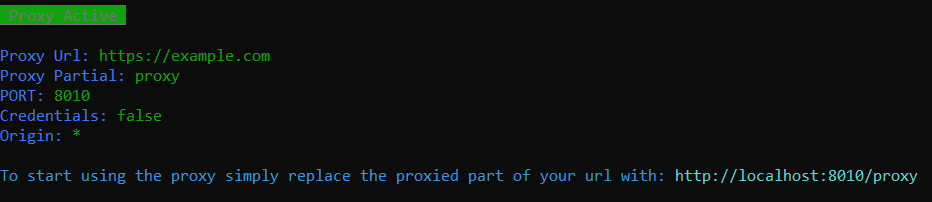
| Option | Example | Default |
|---|---|---|
| --proxyUrl | https://www.google.ie | |
| --proxyPartial | foo | proxy |
| --port | 8010 | 8010 |
| --credentials | (no value needed) | false |
| --origin | http://localhost:4200 | * |
using System;
using System.Collections.Generic;
using System.Linq;
using DocumentFormat.OpenXml.Packaging;
using DocumentFormat.OpenXml.Spreadsheet;
using System.IO;
using Logger;
using DocumentFormat.OpenXml;

namespace Demo
{
    class ExcelManager : IDisposable
    {
        #region Private Variables
        SpreadsheetDocument _document;
        Sheet _sheet;
        Worksheet _worksheet;
        #endregion

        #region Public Properties
        public IEnumerable<Row> Rows { get; private set; }
        #endregion

        #region Constructor
        public ExcelManager(string filePath)
        {
            if(!File.Exists(filePath))
            {
                Logger.log.Error($"Error in DataManager(). File with the following path does not exists:{filePath}");
                return;
            }
            else
            {
                Logger.log.Info($"Processing file at path: {filePath}");
                //Open the Excel file in Edit Mode using OpenXml.
                _document = SpreadsheetDocument.Open(filePath, true);
                _sheet = _document.WorkbookPart.Workbook.Sheets.GetFirstChild<Sheet>();
                _worksheet = (_document.WorkbookPart.GetPartById(_sheet.Id.Value) as WorksheetPart).Worksheet;
                Rows = _worksheet.GetFirstChild<SheetData>().Descendants<Row>();
            }
        }
        #endregion

        public void Dispose()
        {
            _document.Dispose();
            _document = null;
            _sheet = null;
            _worksheet = null;
        }

        #region Public Excel Functions
        public string GetCellValue(Cell cell)
        {
            return _document.WorkbookPart.SharedStringTablePart.SharedStringTable.Elements<SharedStringItem>().ElementAt(Convert.ToInt32(cell.InnerText)).InnerText;
        }

        public string GetCellValueByReference(string cellReference)
        {
            var cell = _worksheet.Descendants<Cell>().Where(c => c.CellReference == cellReference).FirstOrDefault();

            if (cell != null)
            {
                return GetCellValue(cell);
            }
            else
            {
                return null;
            }
        }

        public void UpdateCell(string columnName, uint rowIndex, string value)
        {
            try
            {
                Cell cell = GetCellByColumnName(columnName, rowIndex);
                if (cell != null)
                {
                    cell.CellValue = new CellValue(value);
                    cell.DataType = new EnumValue<CellValues>(CellValues.SharedString);

                    // Save the worksheet.
                    _worksheet.Save();
                }
                else
                {
                    Logger.log.Warn($"Error in DataManager.UpdateCell(). Error: Cell is null");
                }
            }
            catch (Exception ex)
            {
                Logger.log.Error($"Error in DataManager.UpdateCell().Error: {ex.Message} StackTrace:{ex.StackTrace}");
            }
        }
        #endregion

        #region Private Excel functions
        private Cell GetCellByColumnName(string columnName, uint rowIndex)
        {
            Row row = GetRow(rowIndex);

            if (row == null)
                return null;

            string cellReference = GetColumnReference(columnName).FirstOrDefault().ToString();

            if (cellReference == null)
            {
                Logger.log.Warn($"Error in DataManager.GetCellByColumnName(). Error: Cell Reference is null");
                return null;
            }
            else
                return row.Elements<Cell>().Where(c => string.Compare(c.CellReference.Value, cellReference + (rowIndex + 1), true) == 0).First();
        }

        private string GetColumnReference(string columnName)
        {
            var cell = GetRow(0).Elements<Cell>().FirstOrDefault(c => GetCellValue(c) == columnName);

            if (cell == null)
            {
                Logger.log.Warn($"Error in DataManager.GetColumnReference(). Error: Cannot retrieve cell with column name: {columnName}");
                return null;
            }
            else
                return cell.CellReference.Value;
        }

        private Row GetRow(uint rowIndex)
        {
            return Rows.ElementAt(int.Parse(rowIndex.ToString()));
        }
        #endregion
    }
}
